The kitchen bin is full again, the bathroom has been skipped two weeks running, and two housemates are each waiting for the other to notice. The root cause is visibility: no shared list, no named owner for the job, no record of when it last happened.
A free cleaning app fixes the reminder half of that in about ten minutes of setup. The differences show up afterwards, in the parts a feature list never covers. Can the second person see the task without asking? Does a weekly job repeat without being rebuilt every Monday? Do ads sit between you and the checklist you opened the app for? Which buttons stop working when the free tier runs out?
That's the test used below. Each of the eight apps is assessed on what a free user can do in a normal week: shared access, recurring schedules, reminders, timers and ad load. Android is where this gets decided. StatCounter's worldwide mobile operating-system figures put Android at 72.36% of usage against 27.61% for iOS (StatCounter mobile OS market share), so every serious app ships an Android build and the best free cleaning app for Android is rarely the one with the longest feature list.
Table of Contents
- 1. Benny
- 2. Tody
- 3. Sweepy
- 4. Clean My House: Chore Planner
- 5. Nipto
- 6. Flatastic
- 7. Chore Tracker For Families
- 8. Cleaning Schedule – Chores (Coddykit)
- How the free Android cleaning apps compare on free-plan access, ads, and best use
- Choosing the Free Android App That Fits Your Household
1. Benny
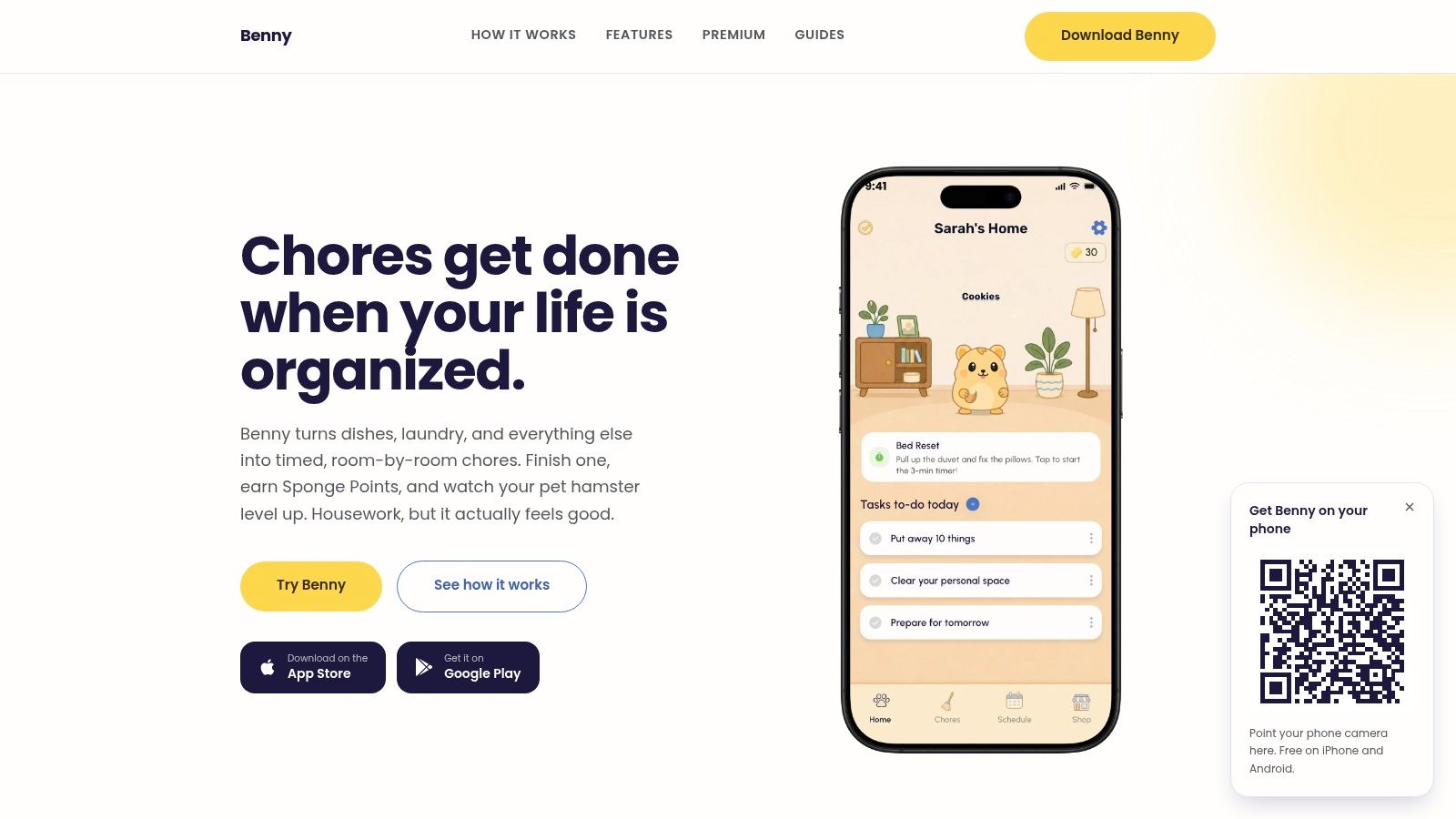
When nobody knows whose turn it is to clean the bathroom, the fix is a shared list with a reminder attached, not a timer living on one person's phone. Benny is a free chore and cleaning app for iPhone and Android that builds that list room by room. Pick the bathroom, add a chore, give it a timer, and set it to repeat, using a preset or a task you name yourself. Presets cover the kitchen, bathroom, bedroom and living room.
What the free plan actually includes
The four things that decide whether a chore app survives past week two are scheduling, reminders, timers and shared access, and all four sit in the free app. Chores can be one-off or recurring, and a reminder fires when one is due. In a shared home, everyone sees the same list, the same assignments and the same record of what's finished, on iPhone or Android, so a household split between an iPhone and a Pixel doesn't fragment into two versions of the truth.
Timers are set per chore. Cleaning the bathroom can be 15 minutes; the oven deep clean is an hour. You start the timer, work until it runs out, and tap finished. That sounds trivial until you've used a chore app where every task shares one countdown and the small jobs eat the time reserved for the big one.
Where the free version pushes you toward Premium
The free app shows ads. Premium removes them and adds the features that handle a week going sideways: holiday and sick modes, snoozing or skipping a chore with your streak protected, mood-based smart chores generated from a daily check-in, home-screen widgets, chore and room filters, multiple homes and custom effort points. It's an optional subscription billed through the App Store or Google Play, and the store shows the price for your region.
Completed chores earn Sponge Points that level a virtual hamster and earn accessories in the in-app shop. Ignore it if a game inside a cleaning app sounds exhausting. It works as a nudge for the people in the house who need one.
Before you upgrade: run the free tier through bin day and one bathroom clean. If the shared list and the reminders do the job, the extras are convenience, not rescue.
2. Tody
Tody solves a narrower problem than most of this list, and solves it well. It tracks when each area of your home was last cleaned and shows you what's drifting out of date, which suits anyone who'd rather build a routine around their own flat than follow a stranger's weekly checklist. The detail lives on Tody's site.
How the tracking works
- Rooms and areas: tasks are grouped by room, so the kitchen and the hallway keep separate histories rather than sharing one vague "clean house" tick.
- Last-completed dates: overdue areas become obvious without you auditing the flat from memory.
- Platforms: Android, iPhone and iPad, so a shared routine isn't hostage to one person's phone choice.
The app doesn't decide for you, which is both the appeal and the cost. You enter the tasks and the intervals, then adjust them after the first fortnight once you learn the bathroom needs doing twice as often as the hallway.
The free plan and its edges
Tody is free to download, with paid features available in-app. Sharing is where the free version gets thin: some household-sharing options sit behind the payment, so test the shared side before you build a routine you expect a partner to see.
Real cost isn't money, it's setup time. A tracker holding 60 tasks you haven't done in a month is a guilt machine. Start with five rooms and ten chores, live with it a week, then add.
3. Sweepy
Sweepy's hook is the leaderboard. Rooms are tracked for how clean they are, overdue jobs rise to the top of the list, chores get distributed among the people who live there, and everyone can see who's ahead this week. In a family with teenagers, or a flat where one person does everything, that visibility is the feature. Setup details are on Sweepy's site.
What a free user actually gets
Sweepy is free to download with in-app purchases, and the daily schedule is the piece most likely to sit behind Premium. That's the limitation that matters here. A cleaning app whose daily plan is paid is a dashboard you can look at but not plan from.
The rest of the free version does the coordinating work: room status, task prioritisation and shared assignment across synced devices. For a household that mainly needs to see whose turn it is, that's usually enough.
Where it goes wrong
Leaderboards motivate some households and irritate others. If one person works shifts and another works from home, the score ranks availability rather than effort, and the person with less time starts ignoring an app that keeps telling them they're losing. App-store reviews report a mixed experience, so run one week before you commit the whole house to it.
4. Clean My House: Chore Planner
The most conventional app on this list, and for plenty of households that is the point. Clean My House: Chore Planner repeats chores daily, weekly, monthly or on a custom interval, files them under room and household-job categories, and puts a Today screen in front of you so the morning starts with the jobs due now rather than a master list.
Free version versus Premium
- Free to install: recurring tasks, room and job categories, daily reminders, the Today list and a task timer.
- Behind the paywall: the master task library, future planning, backup and ad removal.
- Ads: Google Play lists ads and in-app purchases for this planner.
That split matters more than the install price. A comparison of Android cleaning apps argues that roundups often separate download cost from ads, subscriptions, in-app purchases and feature limits too loosely. Apply the same test here: if your household lives on future dates and a ready-made library, the free tier is a front end for paid planning; if you only need today's recurring jobs and a timer, it covers the routine.
The reliability question
Some users have reported task-date tracking problems, a specific failure worth checking before you trust it with a whole house. Set a weekly chore, complete it, and confirm next week's date lands correctly. If recurrence drifts, the planner needs supervising, and a supervised chore app is one more chore.
5. Nipto
Nipto treats chores as a rotation rather than a list. Tasks are scheduled, reminders go out, and the app rotates shared work based on who last completed it. That handles the quiet unfairness in a shared flat better than a static assignment nobody updates, which is why a couple can run it for a year without a negotiation. Details are on Nipto's site.
Free use and paywalls
The official site describes basic use as free across Android, iOS and web, with Premium for additional planning and customisation. Weekly scores or a race between household members, in-app rewards, and managed members for children who don't have phones are all part of the pitch.
- Good fit: households of three or more, families with kids, couples who want a visible shared record.
- Poor fit: one person, or a flat that resents scoring. Solo users carry the setup without gaining the sharing.
A leaderboard works when everyone can win something. When one person is always ahead, the score stops motivating and starts resenting.
6. Flatastic
Shared homes coordinate more than cleaning, and Flatastic is built around that. Recurring chores run daily, weekly or monthly with shared progress anyone in the house can check, and the same app carries shopping lists and expense tracking. If your group chat already mixes who's buying loo roll with who's cleaning the kitchen, one place for both removes a step.
Google Play lists the app with ads and in-app purchases, alongside a substantial user base and a generally positive rating. Useful context, not proof. A large install count says the app got downloaded, not that it stayed on anyone's home screen past week three.
Where it earns its place
- Roommates: chores, shopping and shared costs in one app, which is more coordination than most free chore apps attempt.
- Couples: expense tracking settles the recurring argument about who paid for what.
- Solo households: overkill. You don't need expense splitting with yourself.
If the split itself is the sticking point, a guide to splitting chores with roommates covers the negotiation part no app handles for you.
7. Chore Tracker For Families
Family chore apps usually fail at the same point: the parent sets up a beautiful plan and the children never open it. This one leans on records instead of persuasion. Jobs are organised by room, assigned to members, and logged with completion history, points and streaks, so the account exists whether or not anyone logs in voluntarily. Setup details are on the Google Play listing.
Free, ad-supported, feature-heavy
That listing describes the app as ad-supported, with room categories for kitchens, bathrooms, bedrooms and laundry, recurring schedules and chore presets, assignments and completion statistics, daily reminders, quiet hours and data backup. No clear paid-plan pricing appears in the listing information.
- Presets: common chores are already named and filed, which cuts the setup evening to minutes.
- History and stats: contribution numbers end the "I did it last time" argument with a record.
- Quiet hours: reminders that don't fire at 6am matter more than most feature lists admit.
If your household spans both phone platforms, check that shared chore lists across iPhone and Android behave the way you expect before assigning a fortnight of work into one phone.
8. Cleaning Schedule – Chores (Coddykit)
Most cleaning apps hand you an empty checklist and let you stare at it. Cleaning Schedule – Chores starts from the rooms and surfaces in your home and drafts the plan from what's there, including how often each surface typically needs attention.
The most generous free tier here
According to Google Play, the free version includes unlimited rooms and tasks, a daily due list, a reset builder that suggests jobs for a short window, and household sharing for up to three people. Pro adds care guides and expanded household options.
Test the reset builder first. On a Tuesday evening with 20 minutes and no energy, a list of three jobs that fit beats a full cleaning plan you'll never start.
The risk of a newer app
Coddykit is newer and has a shorter review history than the rest of this list, which matters on Android specifically. StatCounter's Android version market share data shows Android 16 at 37.71% and Android 15 at 16.34%, with Android 14 at 11.45%, Android 13 at 10.90%, Android 12 at 7.11% and Android 11 at 6.08% still in use. Six versions across dozens of manufacturer interfaces is why you check an app's minimum requirement and last update date before handing it the household schedule.
For the stubborn jobs the plan keeps surfacing, like shower glass, removing hard water stains from glass shower doors fills the gap no scheduling app can.
How the free Android cleaning apps compare on free-plan access, ads, and best use
| Item | Free plan includes | Ads in free version | Best for | Paid features |
|---|---|---|---|---|
| Benny (recommended) | Schedules, reminders, timers, shared chores, room presets, and rewards | Yes | Households wanting shared chores with playful motivation | Widgets, filters, holiday and sick modes, multiple homes, custom points, and ad removal |
| Tody | Room-based tasks, completion tracking, and customizable routines | Not stated | People who want a flexible, cleaning-focused tracker | Some household-sharing features may require payment; details not stated |
| Sweepy | Room tracking, task prioritization, and household chore sharing | Not stated | Households that want to share and track cleaning progress | Some features, including daily schedules, may require Premium |
| Clean My House: Chore Planner | Recurring tasks, room categories, reminders, Today list, and timer | Yes | Android users who want a scheduled cleaning planner | Master task list, future planning, backup, and ad removal |
| Nipto | Chore schedules, reminders, task rotation, scoring, and rewards | Not stated | Families, couples, or roommates who want visible chore contributions | Additional planning and customization |
| Flatastic | Recurring chores, shared progress, shopping lists, and expense tracking | Yes | Shared homes coordinating chores and household tasks | In-app purchases; specific features not stated |
| Chore Tracker For Families | Room categories, recurring chores, presets, assignments, reminders, and tracking | Yes | Families organizing chores and member contributions | Paid features and pricing not stated |
| Cleaning Schedule – Chores (Coddykit) | Unlimited rooms and tasks, due list, reset builder, and sharing for up to three people | Not stated | People who want a room-based plan and short cleaning suggestions | Care guides and expanded household options |
Choosing the Free Android App That Fits Your Household
Pick two or three apps from this list, set up the same recurring chores in each one, and run them for a week with everyone who shares the home. A week is long enough to expose the difference between a free plan that fits your household and one that only fits the demo.
Then check three things.
- Do reminders reach everyone? If only the person who installed the app gets the notification, you've built a personal to-do list and called it a household system.
- Does the free plan cover your household size and sharing? A three-person cap is fine for a couple and useless for a family of five, and sharing is the first feature most apps charge for.
- How much do the ads interrupt daily use? One ad before the checklist is a tax on the habit. An ad between every completed chore is the reason people stop opening the app.
The best free plan isn't the one with the longest feature list. It's the one your household still uses in month three.
Subscriptions are sold through the App Store or Google Play, and deleting an app doesn't cancel one. Check the store account before you walk away from a paid tier, and cancel from the store rather than by uninstalling.
The 2024 Kärcher cleaning study, which surveyed 10,025 people across 10 countries, found that 77% named tiredness from the pace of daily life as the most common reason for not cleaning. Not knowledge. Not tools. Energy. That's the brief for a free cleaning app on Android: reduce the number of decisions between you and the next chore, and don't add a system that needs maintaining.
Choose the app that makes the next job obvious and one tap from done. The best free cleaning app for Android is whichever one your household opens without being reminded.
Benny gives you room-by-room chore lists, a timer on every task, recurring schedules with due-date reminders, and a shared home where everyone sees what's finished and what's still outstanding, and all of that sits in the free app on iPhone and Android. Set up one room tonight and invite the people you live with so the list belongs to the whole house rather than one phone. Visit Benny to start your first shared chore list.